Plenty of companies sell a service for a fixed fee every month or every year: maintenance, hosting, operating contracts, or any plan that renews. In many of them that income lives in a spreadsheet that the accountant opens at the start of each month to work out who should be invoiced. One slip and an invoice is forgotten; one late renewal and a customer drifts away without anyone noticing. Clear subscription management software fixes this by remembering the cycle and issuing the invoice on time. In this article we explain how subscriptions work in Subra and what management sees on screen.
Why a spreadsheet isn't enough
A spreadsheet records a subscription but doesn't act on it. As the customer base grows, the same problems keep appearing:
- Forgotten invoices: issuing them depends on someone remembering, so income arrives late or never.
- Late renewals: nobody knows which subscription is about to end until the customer calls.
- Conflicting numbers: the sheet and the accounting system disagree, and reconciling them eats time.
- No big picture: the manager can't say with confidence how much comes in each month, which makes planning hard.
What recurring invoices mean
In the subscriptions module of Subra, each monthly or yearly subscription is entered once, and the system issues its invoice automatically every cycle, renewals included. Nobody retypes an invoice each time. Because the module is part of the same system, the invoice appears in accounting straight away, with no manual transfer between two programs.
The subscriptions dashboard: what management sees
The module has its own dashboard, and its period can be switched between this month, this quarter, this year and the last 12 months.
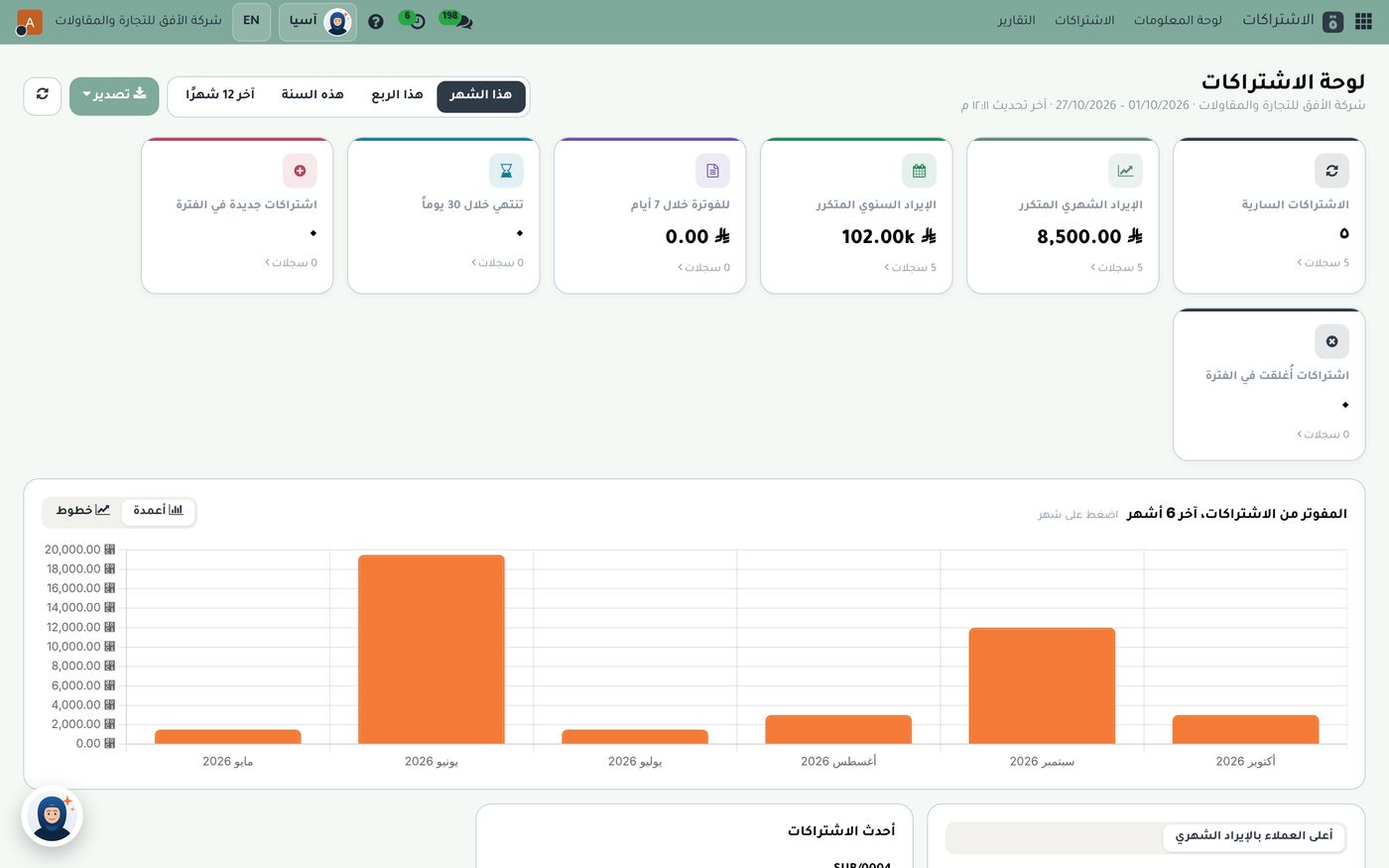
The top row of cards summarizes the position:
- Active subscriptions: how many are running now, five in this demo data.
- Monthly recurring revenue: what the company expects to come in every month from subscriptions, 8,500 SAR here.
- Annual recurring revenue: the same income over a year, about 102 thousand SAR here.
- To invoice within 7 days: invoices about to be issued.
- Expiring within 30 days: subscriptions that need renewing soon.
- New and closed in the period: customers coming in and going out.
Below the cards is a chart of amounts invoiced from subscriptions over the last 6 months, shown as columns or lines, and clicking a month opens its details. The gap between one month and the next is easy to spot, and it prompts a useful question: was it a yearly subscription invoiced in one go, or a customer who left?
How this supports daily decisions
The dashboard is more than a display. It supports specific decisions:
- Cash planning: knowing your monthly recurring revenue lets you build the budget on a figure you can rely on rather than a guess.
- Renewal follow-up: the card for subscriptions expiring within 30 days gives sales a ready call list before a customer lapses.
- Growth tracking: comparing new subscriptions with closed ones shows whether the customer base is growing or eroding.
- Key customers: further down are the latest subscriptions and the top customers by monthly revenue, so you know who you depend on.
Linking subscriptions to accounting
The value of one system is that a recurring invoice enters the normal accounting cycle: customer receivables, collection and the tax report. There is no reconciling a "subscription list" against an "invoice list", because they are the same thing. To see how those numbers read on the accounting side, see How to Read the Accounting Dashboard.
Practical steps to get started
- Gather your current subscriptions in one list with start date, cycle and amount.
- Enter them in the module once each, monthly or yearly according to the contract.
- Name one person to watch the card for subscriptions expiring soon.
- Review the dashboard at the start of each month and compare recurring revenue with the month before.
- Ask the AI assistant Asia about any figure; she is an assistant built for your organization that answers from your company's data.
Summary
Subscription management turns invoicing from a task someone remembers into a cycle the system holds: enter it once, get a recurring invoice on time, never miss a renewal, and see monthly and annual recurring revenue clearly on one dashboard. If you'd like to see it on demo data, the Role8 team will be glad to show you.
Try Industry modules in Subra
Try Subra with demo data, or contact us and we'll set up the system for you.