Rent problems usually start with paperwork: a lease in one folder, a payment schedule in a spreadsheet, an invoice typed by hand every month, and the same question at month-end: how much did we collect, and how much is late? Good property management software brings leases, payments and invoices into one place and ties them to the books, so nobody keys the same figure twice. That is what Subra's Real Estate add-on does. In this article we explain how a company follows its collections with it, and what its real dashboard shows.
Why does manual rent management fall behind?
Rent is recurring income, so any small flaw repeats every month. The usual symptoms when teams rely on separate spreadsheets:
- Due dates live in an employee's memory: reminders arrive late, and so do invoices.
- Invoices written from scratch: the tax or the deposit line is easily forgotten.
- Collections not linked to the lease: the accountant can't tell which instalment was paid and which is still open.
- A scattered picture for management: the collection rate and the overdue amount appear only after someone gathers the numbers by hand.
What does the Real Estate add-on cover in Subra?
The add-on is part of the same system, so it reads from your customers and accounts without a separate program. It covers rental and sale contracts and payment schedules, with automatic rent invoices that include tax. Its top menu is clear: Dashboard, Properties, Contracts, Payments and Settings. Work flows in one line: contract, payment schedule, invoice, collection.
The Real Estate dashboard: collection on one screen
When a manager opens the dashboard, a "Collection" section sits at the top, a "Team" section below it, and a monthly invoicing chart under both.
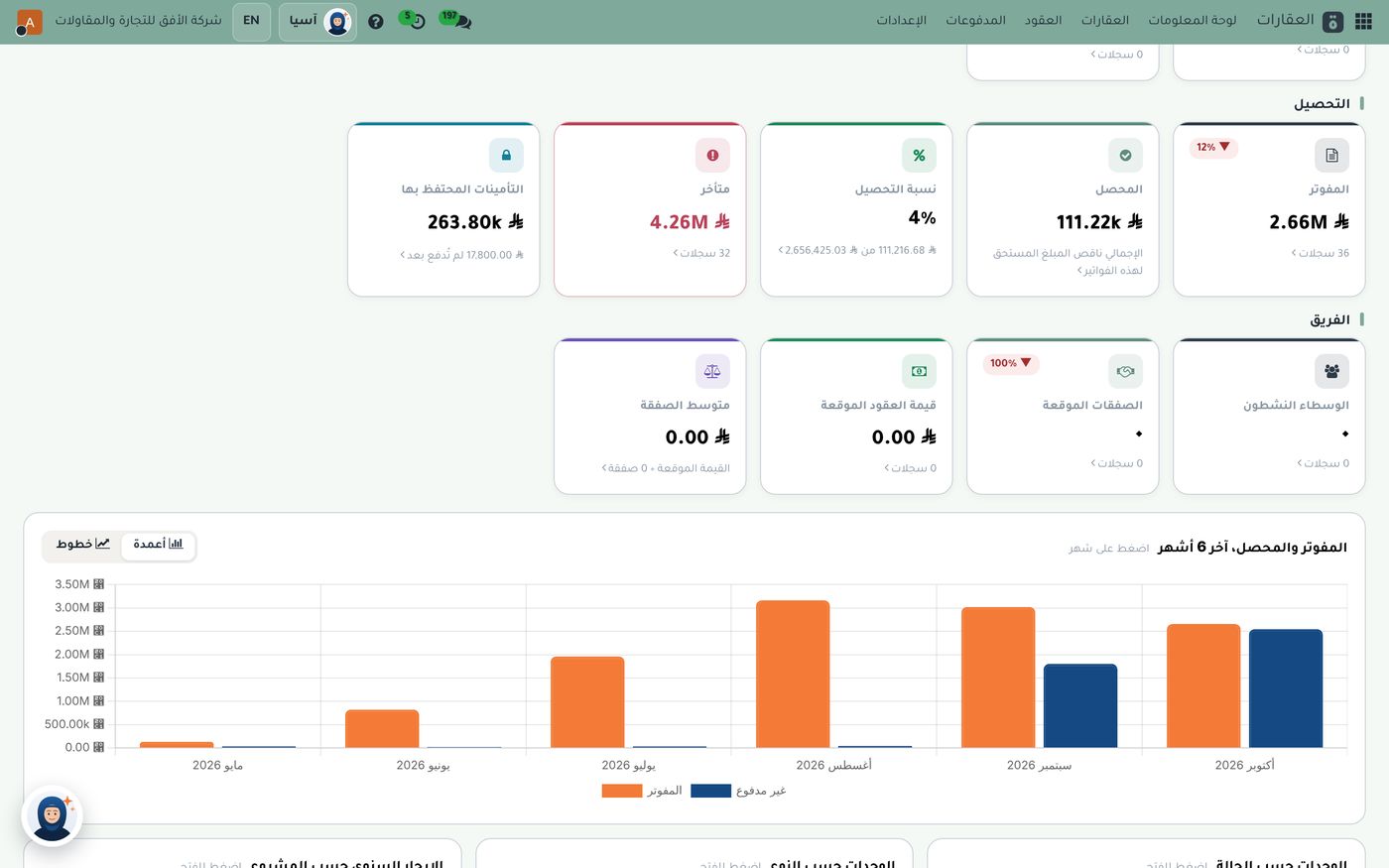
In this demo screen, the invoiced amount is 2.66M across 36 records, the collected amount is 111.22k, and the collection rate is 4%. Next to them, the overdue card shows 4.26M across 32 records, and the deposits-held card shows 263.80k, with a note that 17,800.00 of it has not been paid yet. The "Team" section lists active brokers, expected deals, expected contract value and average deal size, all zero in this data. Below the cards, a bar chart covers the last 6 months, May to October 2026, comparing invoiced with unpaid; it can switch to lines, and you can click a month to open its details. Further down are cards for annual rent by project, units by type, and units by status.
All of these are demo figures, but they show what a manager can see: what was invoiced, what actually came in, and what is still overdue.
Leases and payment schedules
Once the lease is entered, the payment schedule is built from it, and the team no longer has to remember each due date. Rent invoices are issued from that schedule with tax included. That means fewer mistakes on the invoice, on-time delivery, and every amount tied to its lease.
Collections and overdue amounts: what to watch
The key question in rental work is the gap between invoiced and collected. The dashboard puts the two side by side with the collection rate, so the gap is visible without any arithmetic. The overdue card stands out with its own colour and shows the number of late records, so you can open your weekly collection meeting with it. For a deeper look at reading your accounting figures, see How to Read Your Accounting Dashboard Every Morning in 5 Minutes.
Deposits held
A deposit is not income. It is held and returned at the end of the lease according to its terms. That is why the dashboard gives it a card of its own, showing the amount held and how much of it has not yet been paid. It keeps deposits from mixing with rental income and makes them easier for the accountant to track.
Questions to ask before choosing property software
- Are invoices issued automatically? Yes, from the payment schedule, with tax included.
- Can I see the collection rate? Yes, in a clear card beside invoiced and collected.
- Can I follow overdue amounts? Yes, with a card of their own showing the number of records.
- Are units shown by status? Yes, in the dashboard cards.
- Do I need separate accounting software? No. The add-on runs inside the same system and reads from the same accounts.
How to get started
- Enter your properties and their units first, so contracts can be linked to them.
- Create contracts and payment schedules for one or two leases, and check the invoice before you scale up.
- Open the dashboard weekly and review overdue amounts and deposits.
For details of the add-on, see sector solutions, including real estate.
Summary
Managing rent doesn't need more spreadsheets. It needs a single line that starts at the lease and ends at the collection. When leases, payments, invoices and accounts work in one system, the manager sees the collection rate and the overdue amount on one screen and acts before debt builds up. The Role8 team will gladly show you Subra's Real Estate add-on on demo data so you can judge it against your own business.
Try Industry modules in Subra
Try Subra with demo data, or contact us and we'll set up the system for you.